
A lead's page
Everything about one person: what they want, every conversation and call, what happened when, and what your team needs to do next.
Open it from the leads list (click a name, then Open lead), from a campaign's leads, or from Bookings.
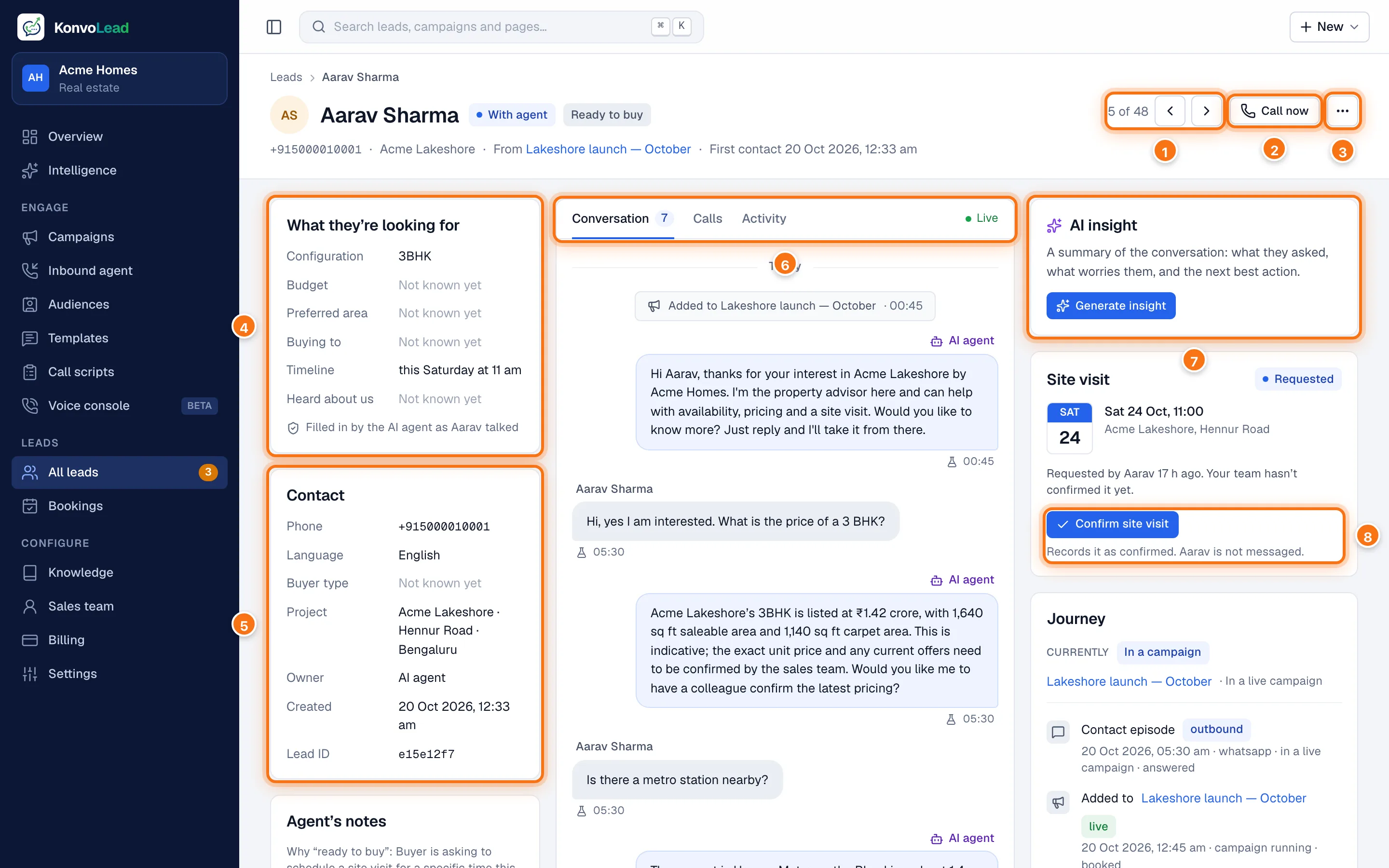
- Where this lead sits in the list you came from, here 5 of 48. The arrows open the previous and next lead in that list.
- Call now rings the lead straight away. See Calling a lead now.
- … has Copy phone number and Copy lead ID.
- What they're looking for: what the agent has learnt. See below.
- Contact: their details.
- Conversation, Calls and Activity. See The conversation.
- AI insight: a summary for your sales team.
- The Site visit, with Confirm site visit while it waits for your team.
Under the name are the lead's status and readiness, their phone number, the project, the campaign they came from (or "Came in inbound") and when they first made contact. When the lead is with your team, Mark handoff resolved appears beside Call now. See Human handover.
What they're looking for
The facts the agent has picked up in conversation: Configuration, Budget, Preferred area, Buying to (live in or invest), Timeline and Heard about us. "Not known yet" means it hasn't come up. A note under a figure says where it came from:
- Stated by the buyer: they named it.
- Confirmed by the buyer: they agreed to a figure the agent suggested.
- Our estimate from the conversation: the agent worked it out, for example from a price it quoted. Treat it as a guide, not as what the buyer said.
On a call-script campaign, a From your customer list card shows what came with them in the file you imported, and which campaign and script they were imported for.
Contact
Phone, Language, Buyer type (for example local, relocating or NRI), Project with its area and city, Owner (the AI agent or the sales rep who has them), Created and Lead ID.
Agent's notes appears below it when the agent has written any, with the reason for the lead's readiness, for example Why "ready to buy": asked to schedule a site visit for a specific time this Saturday.
The conversation
Conversation shows every message on every channel, and updates as messages arrive. Live at the top right says it's listening.
- The agent's messages are marked AI agent. Under each message is its time, with an icon for WhatsApp, a phone call or the test chat.
- On WhatsApp, the agent's messages also show sent, delivered, read or not delivered. Hover over not delivered for WhatsApp's reason.
- Things that happened appear between the messages, for example Added to a campaign, or Site visit requested for Sat 24 Oct, 11:00 — waiting for your team with a Confirm button.
- On a call, if the buyer spoke over the agent, the part they didn't hear is shown faded after "buyer interrupted — rest not heard".
- A file the agent shared, such as a floor plan, appears as a chip under its message. Click it to open the file.
The agent replies by itself; you don't need to do anything here. On a test lead, a Send as lead box sits under the conversation. See Testing the agent yourself.
Calls lists every phone call with the lead: When, Direction (Outbound when we rang them, Inbound when they rang you), Outcome (for example completed, no answer, busy, voicemail), Ended because (for example buyer hung up) and Duration. Test calls made in the browser from the Voice console are marked test. If you record calls, a Recording column lets you play each one. Recordings are kept for 90 days.
Activity is the lead's history in one list, newest first: when the lead was created, campaigns they were added to, site visits, handovers, who was paged and what they did, calls, and when the AI insight was updated.
AI insight
A short summary of the conversation for your sales team. Click Generate insight to write it once the lead has talked to the agent. It shows:
- a summary of who they are and what they want, with their mood and buyer type;
- Questions they asked;
- Concerns they raised;
- the Next best action.
Click the refresh button at the top right to write it again after the conversation has moved on. An insight is also written by itself when a lead is handed to your team, so the sales rep has it ready.
Site visit
The lead's site visit: the day, time and place, and whether it is Requested, Confirmed or done. While a requested visit is still to come, Confirm site visit records that your team has confirmed it. The buyer isn't messaged. To send them a WhatsApp confirmation as well, confirm it on the Bookings page instead. See Site visits and bookings.
If they haven't asked for one, the card says that the agent will book it here when they do.
Journey
How this person reached you, and what has happened since.
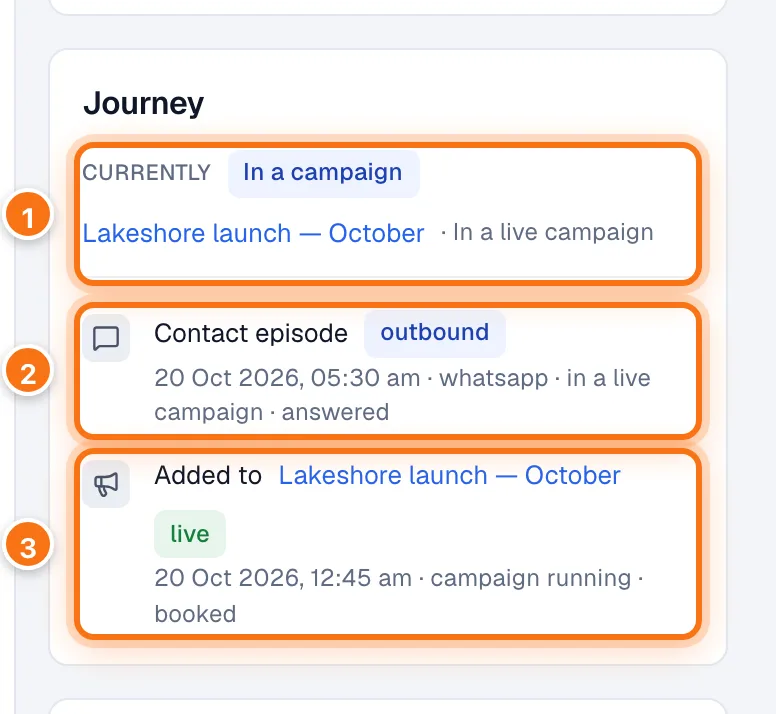
- Currently: whether the lead is right now In a campaign (and which) or Inbound, and why, for example "In a live campaign", "Campaign finished" or "In a campaign that hasn't messaged them yet".
- A Contact episode: one occasion they were in touch, with the date, channel and a badge. outbound means a campaign had contacted them; inbound means they came to you; unserved means the full agent couldn't serve them; disqualified means they were judged not to be a buyer, for example a broker or a job seeker.
- Added to a campaign: the campaign's status and where this lead stands in it, for example "queued to send", "replied", "not interested", "opted out" or "booked". The campaign that currently claims them is marked live.
If a campaign hasn't messaged them yet, its entry says why:
- due a date and time: the message is waiting its turn in the campaign's sending pace.
- held with a reason and a retry time: the message was held back on purpose, for example because another campaign contacted them recently, or because they are in the middle of a conversation with the agent. See Contact cooldown and the 72-hour conversation hold.
Handover
Whether the lead has been handed to your team, why, and every sales rep who was paged. "Not handed to anyone" means the agent has them; if they ask for a person, the next available rep is paged on WhatsApp. See Human handover.
Calling a lead now
Call now has the AI agent ring the lead at once, on the number your account calls from. It asks first, so one click can't ring someone by mistake.
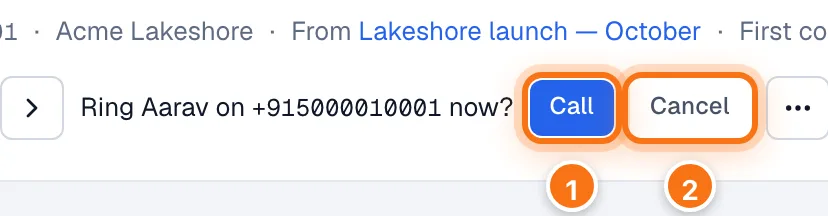
- Call rings them. The call then appears under Calls.
- Cancel leaves it.
Outside your calling hours it warns you first; Call anyway places the call regardless. If the lead can't be called, for example because they opted out, a colleague has them, they were contacted too recently, or they aren't in a running campaign that makes calls, it says so and doesn't ring. Test leads have no number to ring, so Call now isn't shown for them.