
How the agent answers
The agent answers buyers only from the knowledge you give it. This page explains where that knowledge comes from, how it turns into answers, and where to see how much of it is ready.
The rule
The agent doesn't use the internet to answer questions about your projects. It doesn't guess prices or make up offers. Everything it says about a project comes from:
- Documents you upload: brochures, price sheets, floor plans, approval documents.
- Websites and videos you add (real estate).
- Notes you type.
- Facts, prices, places and questions and answers you add or correct by hand.
When nothing on record answers a question, the agent says so and offers to have a colleague confirm. It doesn't make something up.
From your sources to the agent's answers
- You add a source. KonvoLead reads it in a few minutes.
- Facts come out of it. Single facts such as "Possession: December 2027" or "Clubhouse: 32,000 sq ft". These are your facts on record.
- Answers are built. KonvoLead keeps a list of the questions buyers usually ask. For each one it prepares the answer the agent will give, from your facts and the text of your sources. That's how the agent can reply in a second.
- Your team checks the important facts. Prices first.
The agent uses a fact as soon as it is read, before anyone checks it. Checking a fact doesn't switch it on; it confirms it's right. A fact your team checked is never changed by a later document.
So check prices, rates and charges first: the agent quotes them word for word, and it's already using them.
The Knowledge page
In the menu, click Knowledge. Each project has a card.
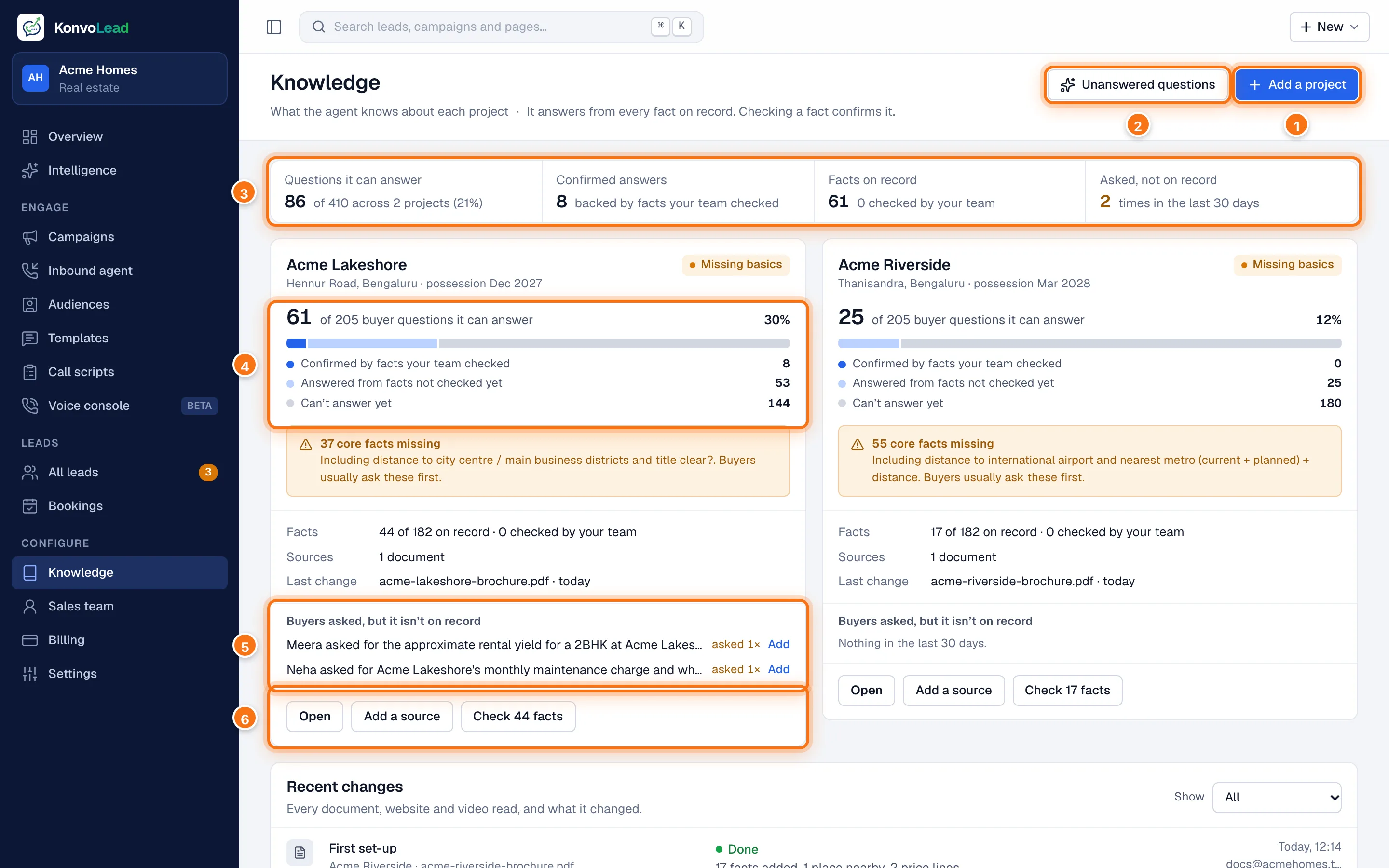
- Add a project starts a new one. See Adding a project.
- Unanswered questions opens what buyers asked that the agent couldn't answer, across all your projects.
- The totals for all your projects:
- Questions it can answer: buyer questions with an answer ready.
- Confirmed answers: answers backed by a fact your team checked.
- Facts on record: facts read from your sources, and how many your team has checked.
- Asked, not on record: how often in the last 30 days a buyer asked something that wasn't on record, so the agent passed it to your team.
- How many buyer questions this project can answer, split into Confirmed by facts your team checked, Answered from facts not checked yet and Can't answer yet.
- Buyers asked, but it isn't on record: questions real buyers asked about this project in the last 30 days that weren't on record. Click Add to answer one.
- Open the project, Add a source, or Check N facts to go straight to the facts nobody has checked.
Under the cards, Recent changes lists every document, website and video read, and what it changed.
What the label on a project means
| Label | Meaning |
|---|---|
| Live | Answers are built and the agent is using them. |
| Updating | A source is being read, or the answers are being rebuilt. The agent keeps answering meanwhile. |
| Rebuilding answers | A source was removed, so the saved answers were taken back and are being built again. Until then the agent looks each question up, which is slower. |
| Missing basics | Facts buyers usually ask first are missing, such as the distance to the city centre. The card names some of them. |
| Stopped part-way | A read stopped before it finished, most likely during an update on our side. Open the project to try again. |
| Not built yet | Nothing has been read, so there are no answers yet. |
A project's page
Click a project's name, or Open.
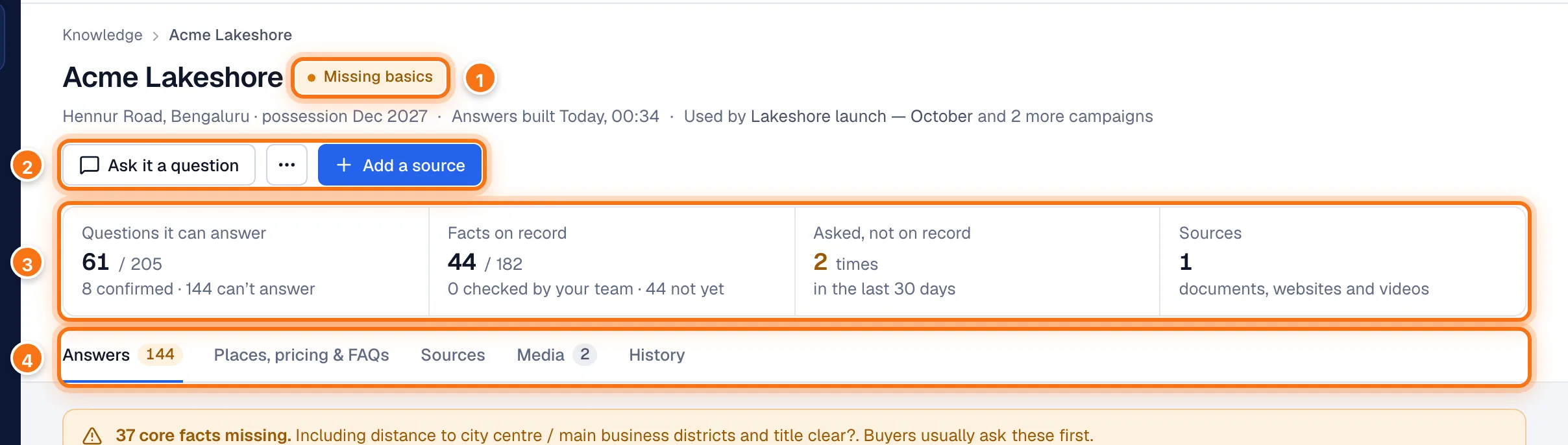
- The project's label (see the table above). Under the name: where it is, when the answers were last built, and which campaigns use it.
- Ask it a question shows what the agent would reply, without saving anything. … (More actions) holds Rebuild every answer, the full read-by-read history, and Delete this project. Add a source adds a document, website or video.
- The four numbers for this project. Click one to jump to the part of the page behind it.
- The tabs:
- Answers: every buyer question, the fact behind it, and whether your team has checked it. The count is the questions it can't answer yet. See What the agent can answer and Checking facts.
- Places, pricing & FAQs: lists that aren't single facts. The tab's name depends on your industry. See Places, pricing and FAQs.
- Sources: everything the knowledge came from. See Sources.
- Media: floor plans and brochures the agent may send on WhatsApp (real estate). See Media.
- History: every read and what it changed. See Keeping knowledge up to date.
Try a question
Click Ask it a question, type what a buyer would ask, and click Ask.
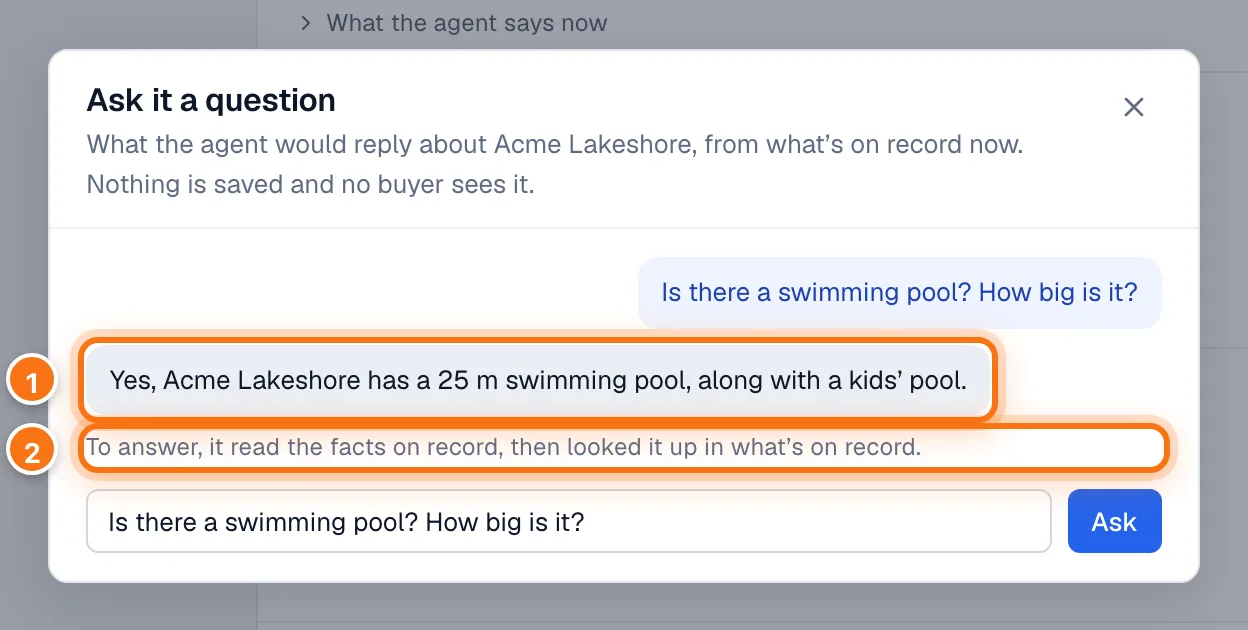
- The agent's reply, from what's on record now.
- What it looked up to answer.
Nothing is saved and no buyer sees it. To try a whole conversation, use Test the agent on All leads. See the Quickstart.